Introduction
In June, Apple released macOS 27, the operating system that will power MacBooks through 2027. Every time a new version is announced, a few older models will be cut off from support for the new macOS. Therefore, many users are wondering: “Will my MacBook stop working?”
While older MacBooks may continue booting and running basic apps, the real question is whether they will still receive macOS updates, feature upgrades, and security patches—all of which determine how long a MacBook remains safe, fast, and compatible with modern software.
For anyone shopping for a Certified Used or Refurbished MacBook, or evaluating whether it’s time to upgrade, understanding which models lose support in 2026 is essential. Apple’s OS support cycle is predictable. The release of macOS 27 gives us a clearer picture of which MacBooks are reaching the end of their usable life.
This guide breaks everything down in a simple, consumer-friendly way—so you can avoid buying a model that’s about to become obsolete.
Clarification
Before diving into lists of supported and unsupported models, it’s important to clarify what “stop working” really means.
A MacBook rarely becomes truly unusable the moment Apple drops support—but it does lose:
- Major OS upgrades
- App compatibility over time
- Safari and browser security updates
- Critical security patches
- Hardware-level feature improvements
- Compatibility with new software frameworks
So when we say a MacBook will “stop working in 2026,” we mean:
It will no longer receive macOS upgrades or essential security updates—making it risky or impractical to use.
This is especially important for shoppers comparing Certified Used or Refurbished MacBooks, because choosing a model that’s losing support in 2026 significantly shortens its remaining lifespan.
How macOS Updates Work
Apple follows a predictable software support cycle for macOS, which directly affects how long a MacBook remains secure, compatible, and fully functional. Understanding this cycle is essential—especially if you are buying a Certified Used or Refurbished MacBook in 2026.
1. Annual Major macOS Release
Apple releases a new version of macOS every year (macOS 15, macOS 26, and now macOS 27). Apple jumped the numbering from 15 to 26 to make it universal across Apple operating systems (for example, iOS 26 and iPadOS 26). It’s also easier for users to remember because macOS 26 aligns with 2026, and macOS 27 is for 2027.
A MacBook must meet Apple’s hardware requirements to install the latest OS. If it doesn’t support the new release, it immediately enters “legacy” status.
2. Feature Updates for 1 Year
Each major macOS version typically receives additional features and enhancements for about one year, until the next version is released. Devices supported by the newest macOS get:
- New system features
- UI improvements
- Performance upgrades
- Compatibility with new Apple frameworks
Older devices that miss the upgrade lose out on these improvements.
3. Security Updates for 2–3 More Years
After a MacBook stops receiving the newest macOS version, Apple continues to release security patches for older macOS versions—usually up to three total supported versions (current + two prior).
This keeps older MacBooks protected from major vulnerabilities, even without new system features.
4. End of Life: No More Security Updates
When Apple stops providing security updates, the MacBook is officially End of Life (EOL). This is when risks increase:
- Browsers stop updating
- Apps become incompatible
- Security threats increase
- Online banking and secure sites may block older macOS
- Performance degradation becomes noticeable
This is when a MacBook is effectively considered to have “stopped working” for modern use.
When macOS Support Ends
Apple’s macOS support lifecycle follows a predictable pattern, and understanding it helps you determine when a MacBook is truly nearing the end of its usable life. A MacBook is considered “supported” as long as it receives at least:
- The latest macOS version OR
- Ongoing security updates
Once both end, the device becomes obsolete.
Stage 1: No Longer Supports the Latest macOS but Still Receives Limited Security Updates
When a MacBook cannot upgrade to the newest macOS (in this case, macOS 27), it enters a limited-support phase that includes:
- Missing new macOS features
- Missing performance and battery optimizations
- Receiving only security patches for 1–2 more years
In this stage, the MacBook still works, but it begins showing noticeable limitations:
- Slower Safari performance
- Reduced app compatibility (especially pro apps like Adobe, Final Cut, and Logic)
- Newer accessories or software may not be supported
- Some iCloud and ecosystem features may not function fully
- Hardware-level improvements from newer macOS versions are unavailable
This “limited support” stage is a clear warning sign that the device is entering its end-of-life cycle.
Stage 2: Security Updates Stop — End of Life
Once Apple stops releasing security updates for the macOS version your MacBook is limited to, the device becomes officially obsolete for modern use.
This is when a MacBook effectively “stops working” from a practical standpoint:
- Safari stops supporting modern websites
- Chrome and Firefox stop updating
- Banking and secure sites may block access
- App developers discontinue support
- Security vulnerabilities increase
- iCloud and ecosystem services may malfunction
- Core apps (Messages, Photos, etc.) may break or behave unpredictably
At this point, upgrading is no longer optional—it’s necessary to remain safe, compatible, and productive.
The New macOS 27 Golden Gate
In June, Apple announced macOS 27, which focuses on advanced AI. For the new macOS, Apple has cut off all non-Apple-chipset models. Only MacBooks with Apple chipsets (e.g. M1, M2, etc.) will be supported by macOS 27. Therefore, we have updated the article and our model recommendations regarding Certified Used/Refurbished MacBooks.
Previous macOS Versions
Prior to macOS 27, the following macOS versions are actively receiving updates:
| Major Version |
Last Version Number |
Last Update |
| macOS Tahoe (26) |
macOS Tahoe 26.5.2 |
29 Jun 2026 |
| macOS Sequoia (15) |
macOS Sequoia 15.7.7 |
11 May 2026 |
| macOS Sonoma (14) |
macOS Sonoma 14.8.7 |
11 May 2026 |
| macOS Ventura (13) |
macOS Ventura 13.7.8 |
20 Aug 2025 |
These versions represent the currently supported macOS family:
- macOS Tahoe (26) — In transition to security updates only
- macOS Sequoia (15) — Security updates only
- macOS Sonoma (14) — Security updates only
- macOS Ventura (13) — Security updates only, expected to reach end of support soon
Anything older than macOS Ventura has already entered End of Life, meaning no security updates and rapidly declining app support.
With macOS 26 setting the new baseline for 2026, any MacBook unable to install it—or unable to remain within the supported versions listed above—is at immediate risk of becoming obsolete.
🚫 List of MacBook Models That Are End of Life
All MacBook models from 2017 or earlier are now considered End of Life (EOL). These models can no longer install newer macOS versions and have lost eligibility for security updates, making them risky to use for work, school, or even basic web browsing.
Older apps, browsers, and iCloud services may also stop functioning reliably on these machines.
Below is a complete list of MacBook Pro and MacBook Air models that are fully obsolete in 2026.
MacBook Pro — End of Life Models
| Model |
Year |
Screen Size |
CPU Options |
Initial OS |
Final OS |
Last Security Update |
| MacBook Pro |
2013 |
13" & 15" |
Intel i5 / i7 |
OS X Mavericks (10.9) |
macOS Big Sur (11) |
Sep 2023 / Feb 2026* |
| MacBook Pro |
2014 |
13" & 15" |
Intel i5 / i7 |
OS X Mavericks (10.9) |
macOS Big Sur (11) |
Sep 2023 / Feb 2026* |
| MacBook Pro |
2015 |
13" & 15" |
Intel i5 / i7 |
OS X Yosemite (10.10) |
macOS Monterey (12) |
Jul 2024 |
| MacBook Pro |
2016 |
13" & 15" |
Intel i5 / i7 |
macOS Sierra (10.12) |
macOS Monterey (12) |
Jul 2024 |
| MacBook Pro |
2017 |
13" & 15" |
Intel i5 / i7 |
macOS Sierra (10.12) |
macOS Ventura (13) |
Aug 2025 |
MacBook Air — End of Life Models
| Model |
Year |
Screen Size |
CPU Options |
Initial OS |
Final OS |
Last Security Update |
| MacBook Air |
2013 |
11" & 13" |
Intel i5 / i7 |
OS X Mountain Lion (10.8) |
macOS Big Sur (11) |
Sep 2023 / Feb 2026* |
| MacBook Air |
2014 |
11" & 13" |
Intel i5 / i7 |
OS X Mavericks (10.9) |
macOS Big Sur (11) |
Sep 2023 / Feb 2026* |
| MacBook Air |
2015 |
11" & 13" |
Intel i5 / i7 |
OS X Yosemite (10.10) |
macOS Monterey (12) |
Jul 2024 |
| MacBook Air |
2017 |
13" |
Intel i5 / i7 |
macOS Sierra (10.12) |
macOS Monterey (12) |
Jul 2024 |
12-Inch MacBook — End of Life
Apple introduced the 12-inch MacBook (also known as the Retina MacBook) in 2015 as a lightweight option between the MacBook Air and MacBook Pro. This lineup was discontinued after 2017 and has fully reached End of Life.
| Model |
Year |
Screen Size |
CPU Options |
Initial OS |
Final OS |
Last Security Update |
| 12-inch MacBook |
2015 |
12" |
Intel Core M |
OS X Yosemite (10.10) |
macOS Big Sur (11) |
Sep 2023 / Feb 2026* |
| 12-inch MacBook |
2016 |
12" |
Intel Core M |
OS X El Capitan (10.11) |
macOS Monterey (12) |
Jul 2024 |
| 12-inch MacBook |
2017 |
12" |
Intel Core M / i5 / i7 |
macOS Sierra (10.12) |
macOS Ventura (13) |
Aug 2025 |
* Officially, macOS Big Sur (11) retired in Sep 2023, but Apple released a surprise update (macOS Big Sur 11.7.11) in Feb 2026 to update security certificates for FaceTime and Messages, ensuring they continue working until January 2027. It doesn’t change the fact that macOS Big Sur (11) and its related MacBook models have reached EOL.
⚠️ Models That Still Receive Security Updates but Don’t Support macOS 27
With macOS 27, Apple has drawn a clear line between Intel-chipset MacBooks and Apple-chipset MacBooks. The Intel-chipset models cannot install macOS 27 but still receive security updates for now. They will become End of Life within the next 1–2 years.
MacBook Pro — Limited Support
| Model |
Year |
Screen Size |
CPU Options |
Initial OS |
Final OS |
Last Security Update |
| MacBook Pro |
2018 |
13" & 15" |
Intel i5 / i7 / i9 |
macOS High Sierra (10.13) |
macOS Sequoia (15) |
May 2026 |
| MacBook Pro |
2019 |
13" & 15" |
Intel i5 / i7 / i9 |
macOS Mojave (10.14) |
macOS Sequoia (15) |
May 2026 |
| MacBook Pro |
2019 |
16" |
Intel i7 / i9 |
macOS Catalina (10.15) |
macOS Tahoe (26) |
Jun 2026 |
| MacBook Pro |
2020 |
13" |
Intel i5 / i7 |
macOS Catalina (10.15) |
macOS Tahoe (26) |
Jun 2026 |
MacBook Air — Limited Support
| Model |
Year |
Screen Size |
CPU Options |
Initial OS |
Final OS |
Last Security Update |
| MacBook Air |
2018 |
13" |
Intel i5 |
macOS Mojave (10.14) |
macOS Sonoma (14) |
May 2026 |
| MacBook Air |
2019 |
13" |
Intel i5 |
macOS Mojave (10.14) |
macOS Sonoma (14) |
May 2026 |
| MacBook Air |
2020 |
13" |
Intel i3 / i5 / i7 |
macOS Catalina (10.15.5) |
macOS Sequoia (15) |
May 2026 |
✅ Models That Support macOS 27 and Receive Ongoing Updates
These MacBook models support macOS 27 (Golden Gate), receive feature updates, and will continue receiving security patches for years. They are the safest and most future-proof Certified Used or Refurbished MacBooks for 2026–2027.
MacBook Pro — Fully Supported
| Model |
Year |
Screen Size |
CPU Options |
Initial OS |
Support macOS 26 |
| MacBook Pro | 2020 | 13" | Apple M1 | macOS Big Sur (11) | Yes |
| MacBook Pro | 2021 | 14" & 16" | Apple M1 Pro / M1 Max | macOS Monterey (12) | Yes |
| MacBook Pro | 2022 | 13" | Apple M2 | macOS Ventura (13) | Yes |
| MacBook Pro | 2023 (Jan) | 14" & 16" | Apple M2 Pro / M2 Max | macOS Ventura (13) | Yes |
| MacBook Pro | 2023 (Nov) | 14" & 16" | Apple M3 / M3 Pro / M3 Max | macOS Sonoma (14) | Yes |
| MacBook Pro | 2024 | 14" & 16" | Apple M4 / M4 Pro / M4 Max | macOS Sequoia (15) | Yes |
| MacBook Pro | 2025 | 14" & 16" | Apple M5 / M5 Pro / M5 Max | macOS Tahoe (26) | Yes |
MacBook Air — Fully Supported
| Model |
Year |
Screen Size |
CPU Options |
Initial OS |
Support macOS 26 |
| MacBook Air | 2020 | 13" | Apple M1 | macOS Big Sur (11) | Yes |
| MacBook Air | 2022 | 13" | Apple M2 | macOS Ventura (13) | Yes |
| MacBook Air | 2023 | 15" | Apple M2 | macOS Ventura (13) | Yes |
| MacBook Air | 2024 | 13" & 15" | Apple M3 | macOS Sonoma (14) | Yes |
| MacBook Air | 2025 | 13" & 15" | Apple M4 | macOS Sequoia (15) | Yes |
Any MacBook listed above is a safe buy in 2026 and offers full macOS 27 compatibility, ongoing security updates, strong long-term app support, and modern Apple ecosystem functionality. These are the models to choose if you want a future-proof Certified Used or Refurbished MacBook.
Recommendation
If you want a MacBook that will stay fast, secure, and fully supported through 2026 and beyond, the rule is simple: choose a model that supports macOS 27 and continues to receive security updates.
Best Overall Picks (2025–2026)
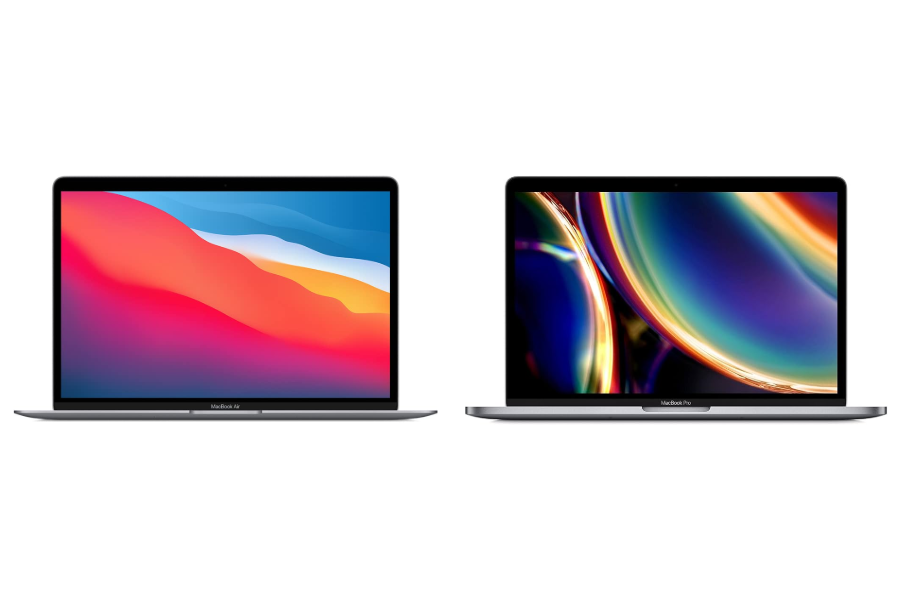
For most shoppers looking for the best balance of price, performance, and long-term support, these two models are the clear winners:
While Apple has increased the prices of new MacBooks, both models stay at the same price level, delivering outstanding value and continuing to receive:
- macOS 27 feature updates
- Ongoing security support
- Full compatibility with modern apps
- Excellent battery life and long-term reliability
What to Avoid
- Skip all 2017 and older MacBook models — they are officially End of Life.
- Avoid Intel-based MacBooks from 2018–2020 unless you only need short-term use, as they do not support macOS 27.
Bottom Line
If you’re upgrading or shopping Certified Used or Refurbished, the M1 MacBook Air and M1 MacBook Pro are the smartest, most future-proof choices at the best prices in 2026.
FAQ — What MacBooks Will Stop Working in 2026
1. Will my MacBook stop working in 2026?
No. Your MacBook will not suddenly shut down or stop turning on in 2026. However, many older models will stop receiving macOS updates and security patches, making them unsafe and impractical for modern use.
2. What does "stop working" actually mean for a MacBook?
When Apple drops macOS and security support, a MacBook:
- Stops receiving security updates
- Loses app compatibility over time
- Experiences browser and website issues
- Becomes vulnerable to security risks
At that point, it is considered obsolete for everyday use.
3. Which MacBook models are End of Life in 2026?
All MacBook Pro, MacBook Air, and 12-inch MacBook models from 2017 or earlier are End of Life in 2026. These models no longer receive macOS upgrades or security updates.
4. Can I still use a MacBook that doesn't support macOS 27?
Yes, but with limitations. MacBooks that don't support macOS 27 may still run basic apps, but they will gradually lose compatibility with apps, browser updates, and security protections. They are not recommended for work, school, or online banking.
5. What macOS versions still receive security updates in 2026?
Other than the latest macOS 27, Apple still provides updates for:
- macOS 26 (Tahoe) — security updates only
- macOS 15 (Sequoia) — security updates only
- macOS 14 (Sonoma) — security updates only
- macOS 13 (Ventura) — limited security updates
Anything older is already End of Life.
6. Which MacBooks still support macOS 27?
All MacBooks equipped with Apple chipsets (e.g. M1, M2, etc.) support macOS 27, including:
- MacBook Air (2020 M1 and newer)
- MacBook Pro (2020 M1 and newer)
These models offer the longest remaining lifespan.
7. Are Intel MacBooks still worth buying in 2026?
No. A few models were still supported early this year. However, since the macOS 27 announcement, all Intel-chipset MacBooks have been dropped. Therefore, it is not worth buying any Intel MacBooks now. Instead, Apple-chipset MacBooks are the better choice for future-proofing.
8. What is the safest refurbished MacBook to buy in 2026?
The safest Certified Used or Refurbished MacBooks in 2026 are the MacBook Air (M1, 2020) and MacBook Pro (M1, 2020). Both support macOS 27, receive ongoing security updates, and offer excellent price-to-performance value.
9. How long will Apple Silicon MacBooks stay supported?
Apple Silicon MacBooks are expected to receive macOS and security updates for many years, significantly longer than Intel-based models.
10. Should I avoid buying older refurbished MacBooks?
Yes. Avoid buying any MacBook from 2017 or earlier, as well as Intel MacBooks that no longer support macOS 27. Buying an unsupported refurbished MacBook significantly shortens its usable lifespan.
11. How can I check if my MacBook will stop receiving updates?
If your MacBook uses Apple Silicon (M1, M2, M3, and newer), it will have long-term support. For Intel-based models, refer to the support lists earlier in this blog to confirm eligibility.
12. What happens when a MacBook no longer receives security updates?
Once security updates stop, browsers stop updating, apps become incompatible, online banking and secure sites may block access, and security risks increase. This is when upgrading becomes necessary.

 Sale
Sale